Pixel Jester Font: Adding Whimsy to Web Design with Purpose
Choosing the Right Typeface for a Creative Portfolio Homepage
I was deep into designing a portfolio homepage for a digital illustrator who wanted to showcase their vibrant, playful style. The layout was clean, with lots of white space and full-bleed image sections. The challenge was finding a typeface that matched the creative energy without sacrificing readability or professionalism. That’s when I tried Pixel Jester.
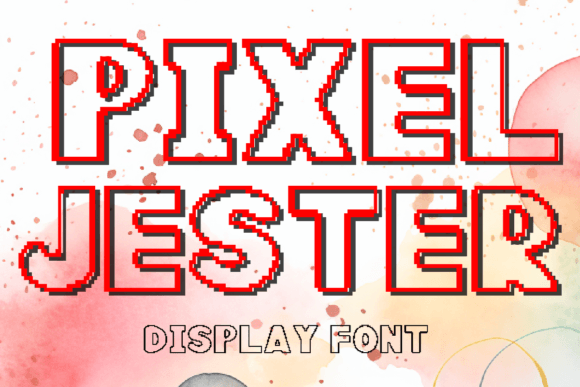
Pixel Jester is a display font designed with a pixel art aesthetic. It includes 26 capital letters and 10 numbers, making it ideal for short-form text. The font has a retro, hand-crafted charm that immediately brings a sense of fun and nostalgia. It’s not meant for long paragraphs or body text, but rather for headlines, callouts, and accent elements that need to stand out.
Testing Pixel Jester in the Hero Section
The first place I dropped Pixel Jester into the layout was the hero section. The client’s name sits at the top of the page in a bold, oversized header. I set the font to 48px on desktop and adjusted it responsively down to 32px on mobile. The result? Instant character. The pixel edges gave the name a game-like, illustrative feel that aligned perfectly with the artist’s personal brand.
It’s important to note that Pixel Jester isn’t a workhorse font. It doesn’t have lowercase letters or punctuation, so it’s best used in short bursts. But in the hero section—where you’re trying to capture attention and set the tone—it worked beautifully.
Using Pixel Jester Across Web Components
Once I saw how well it performed in the hero, I started exploring other areas of the site where Pixel Jester could bring personality. Here’s where I found it most effective:
- Call-to-action buttons: Used sparingly on buttons like “See My Work” or “Download Portfolio,” it added a bit of visual flair without distracting from the action.
- Section headers: On a “Featured Projects” section, I used it for the heading to draw the eye and break up the layout.
- Logo text: The client wanted a custom logo treatment for their site header. Pixel Jester fit the brief perfectly—nostalgic, creative, and modern.
- Blog headers: For a blog redesign I worked on earlier this year, I used Pixel Jester as the featured header font to give posts a more editorial, curated feel.
Each time, I made sure to pair it with a clean, readable sans serif font like Inter or Open Sans for body text and navigation. This contrast helped maintain visual hierarchy while keeping the design balanced and user-friendly.
Readability Considerations on Mobile
Pixel Jester works best at larger sizes. On mobile, I made sure to test how it rendered at different breakpoints. At 24px and below, some of the pixel detail starts to blur, especially on lower-resolution screens. So I limited its use to above-the-fold headers and avoided placing it on dark backgrounds without sufficient contrast.
For image overlays, I added a subtle background tint behind the text to ensure legibility. This was especially important in a promotional banner where the font was layered over a colorful background. A light semi-transparent overlay helped the text pop without altering the font’s character.
Font Pairing for Web Design Success
One of the biggest lessons I’ve learned in web typography is the power of contrast. Pixel Jester is a decorative display font, so pairing it with a minimalist sans serif creates a strong visual rhythm. I used it alongside fonts like Montserrat, Lato, and even Georgia for a more editorial look.
For a course sales page I recently designed, I used Pixel Jester for the headline and Georgia for the subheadline and body copy. The serif gave the page a more grounded, trustworthy feel, while Pixel Jester kept the tone approachable and creative.
It’s also worth noting that Pixel Jester works well in branding kits. I included it as an accent font in a digital brand identity package for a boutique game studio. It was used in social media graphics, promotional banners, and app store assets—always in short bursts, always for visual impact.
Checking Webfont Availability and Licensing
Before finalizing any font choice for a live website or client project, I always double-check the webfont availability and licensing terms. Pixel Jester is typically available in WOFF and TTF formats, which are standard for web use. I embedded it via @font-face in the CSS and made sure it loaded efficiently.
It’s also important to verify that the font includes commercial licensing, especially when using it for client work or online stores. Pixel Jester is usually sold with a commercial license, but it’s always worth confirming before deployment.
Final Thoughts: When to Use Pixel Jester
Pixel Jester is not a one-size-fits-all font. It’s best suited for digital spaces where personality and visual storytelling are key. It shines in:
- Creative portfolios
- Boutique online stores
- Game-related landing pages
- Course sales pages
- Branded social media graphics
- Editorial blog headers
If you're designing a site that needs a bit of whimsy without going overboard, Pixel Jester can be the perfect accent. Just remember to use it strategically, pair it with a clean supporting font, and test it thoroughly across devices and screen sizes.
As a web designer, I’m always looking for typefaces that help tell a story and support a brand’s voice. Pixel Jester does exactly that—playful, precise, and purposeful when used right.